Infrastructure components of a Design System — a looking glass view
Built the infrastructure layer of Nova 2.0 — layouts, containers, and navigation for a multi-product design system.
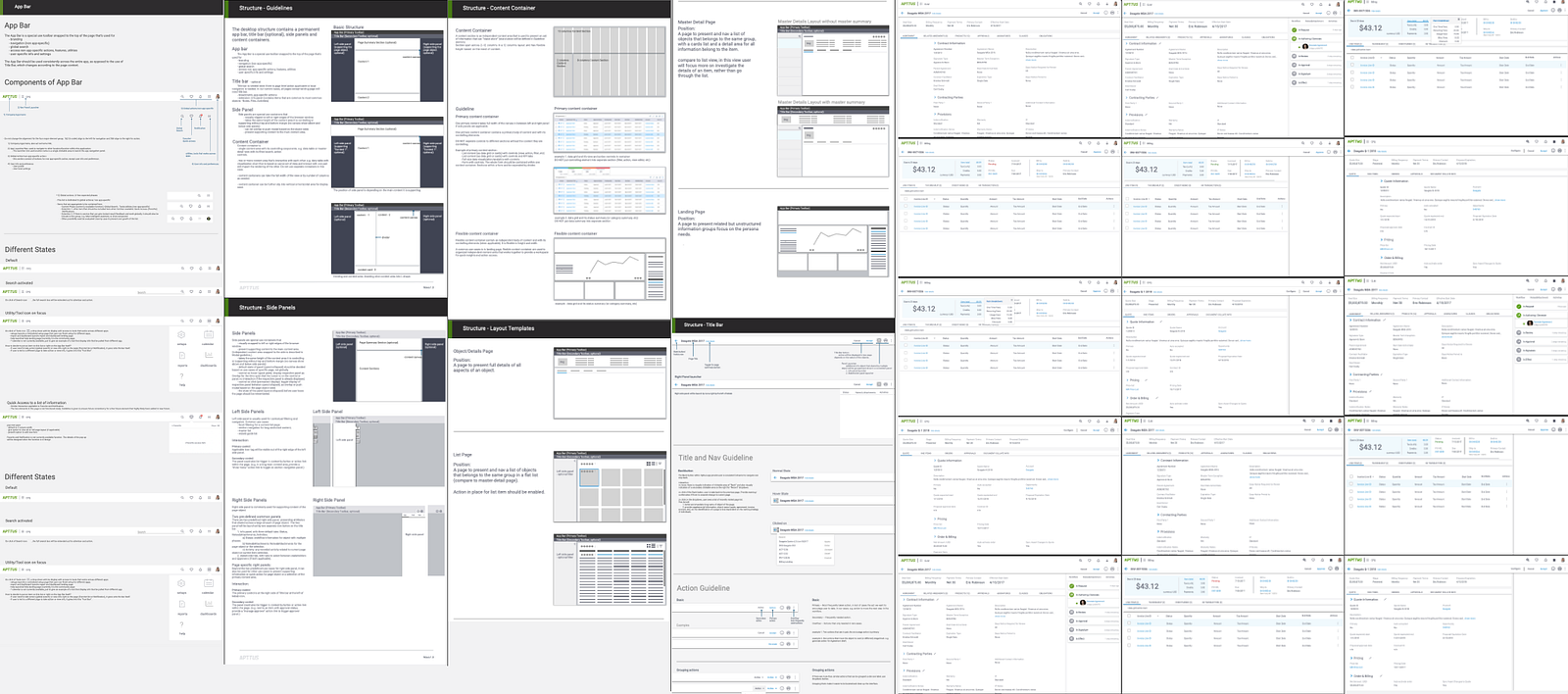
Infrastructure components of a Design System — a looking glass view
Design systems have gained attention over years as a way to enable scalable, consistent, and efficient design solutions. It always consists of a set of atom level elements. Infrastructure level? Not always there. To enable highly complex and connected business processes, it is equally or even more important to create infrastructure level of structure at design system level.
Over the past few years, I’ve been a contributor to or user of four different design systems, at different stage of maturity. Nova Design System, was the one we used and recreated at Apttus (Conga). I was the designer and owner of the infrastructure components for Nova 2.0. (Each product/visual designer on our team designed and owned different perspective of the design system.)
The Context
The existing design system — Nova 1.0 — was no longer enough for the growing needs. This was reflected in the products experience starting to growing apart, among the three 3 product pillars and close to 10 products. Nova 1.0 was also too under-documented to be used consistently. It was a good timing and necessity to rethink about it.
This article is not going to talk about all the details of how the whole team setup the entire design system, but to spend time talking about the considerations for designing the “infrastructure” components for a specific set of use cases.
Though the atomic components and visual perspectives are incredible important to any design system, they are relatively easy to borrow. The “whys” of atoms and visuals are based on relatively universal factors such as ergonomics, cognitive ergonomics and visual trend (set branding aside for now). On the other hand, infrastructure components are much harder to borrow, because the “whys” are very hard to understand from the transient layout images.
The Use Case Considerations
The design process for infrastructure of each design system is likely to be different, depends on how much you know about the potential use cases. Based on the knowledge matrix, we can consider the use cases (existing and potential/possible) into four groups, as I charted below.
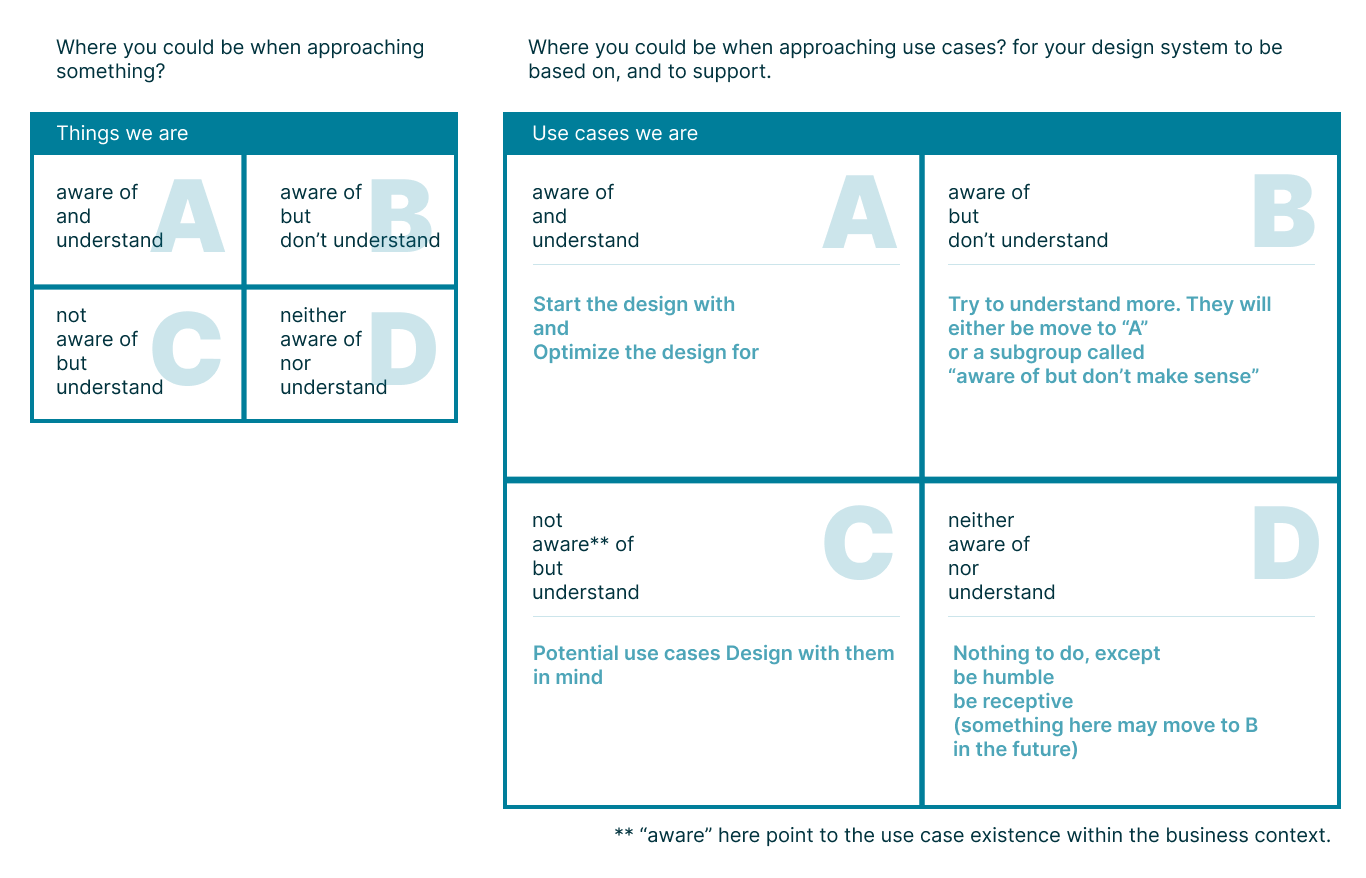 Use Case/ Knowledge Matrix
A In our case, We have a solid set of use cases in zone A. The products are already in use for years with roughly a hundred of customers, including many high profile names. It is a pretty good situation to redefine the structure. This set of use cases are the foundation for defining the high level components including layout, container (main, panel, pop-up, etc), navigation, etc.
BIn this context, aware but not “understand” means it is in practice but not fully justified. e.g. There were a billing method that were only used by one customer. It is a viable and important use case when we design for that specific feature, but I would say it is in Zone B when design infrastructure level of design system. We won’t be able to optimize for this zone, but be aware of a few. They are important cases to use to be sure the infrastructure level design is not blocking the flow.
C Again, in this context, it means not aware of certain use case in customer practice, but we may consider it a potential from product/design perspective. e.g. An AI based billing assistant.
D we don’t know what we don’t know. At atom level, it is usually not destructive to add new item in the design system for new use cases. At infrastructure level, it could be, so it is more essential to go a little further based on B and C, even though some may not be immediate need. One other thing we can do here is more on mindset — always be open-minded, willing to hear.
Some More Thoughts
It was a project I worked on 5 years ago, so here is a looking glass view to add.
- Design System is not just for designers. More importantly, it should be considered as a shared understanding of the whole product-design-engineering team. As a result, documentation is very important. Make sure this “shared understanding” is in a shared accessible space.
- Documentation is not just a list of visual elements, it needs to include applicable context, basic design rationale (intention), applied example and possible interactive “playground”. Documentation is as important as the design itself.
- At infrastructure level, we’ve defined layout, container (main, panel, pop-up, etc), navigation. When look back, I would add “language” — the way you talk via the UI. The interaction is not only via navigation but also personable and respectful language communication.
- Last but not least, probably more importantly, Design System should be an enabler, not a restrictor.